1. Welcome Hearth.com Guests and Visitors - Please enjoy our forums!
    Hearth.com GOLD Sponsors who help bring the site content to you:
    Jotul Cast Iron Stoves
    Woodstock Soapstone Stoves
    Hearth and Home (QuadraFire and Harman Stoves)
  1. dorkweed Feeling the Heat

    joined: Jan 8, 2012
    321 posts
    The 57th State
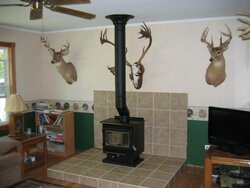
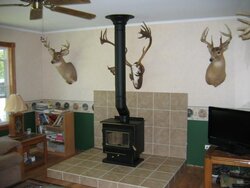
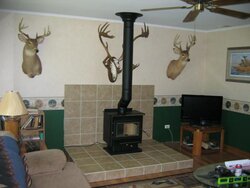
    For some time now I've been trying to post pix of my on-going wood stove install. The site keeps rejecting my pix!!! As of now, I'm 95% done on the interior of my house. But y'all can't see that, 'cause I can't post it!!!!!! Worked well from when I posted the........"Hearth Done...............Almost" thread!!!

    Since then, it's been a no go!!!!! Same camera settings......everything!! What the hell///
    #1

    Helpful Sponsor Ads!


  2. webbie Administrator

    joined: Nov 17, 2005
    10,949 posts
    Western Mass.
    What does it say when you get the error?

    Can you send me one of the pics by email to webmaster@hearth.com?
  3. dorkweed Feeling the Heat

    joined: Jan 8, 2012
    321 posts
    The 57th State
    Done!!

    Thanks!!
  4. Extendaflue Guest

    joined:
    0 posts
    Ok, I am trying to upload them as another regular member account....
    IMG_1323.JPG IMG_1324.JPG
  5. craigiss Guest

    joined:
    0 posts
    And as even another member

    Attached Files:

  6. craigiss Guest

    joined:
    0 posts
    Hmmm, seems to work fine.....
    The pics are fine. They could even be bigger.

    Just to make certain, let me know two things if you can

    1. The forum you tried to post in
    and
    2. The error code (text) that you received.
    and
    3. What browser are you using ? (IE, Firefox, etc.)

    I will then try to post in that forum....

    The uploader is a Flash thingy. It may be that you have to update your flash plug-in. Although it may be a PITA, when something like this happens, you should also check it in this way:

    1. Restart the computer - in fact, turn the computer off. Before you do that, log out of hearth.com. If you really want to go nuts, delete your hearth.com cookies (in your browser prefs).

    2. Try it with another browser - chrome, for instance - and see if the same thing happens.

    3. Make sure your flash plug-in is up to date
    http://get.adobe.com/flashplayer/

    Sorry for the problems! If it persists, email me the batch of photos and let me know the thread you want them in!

Share This Page