1. Welcome Hearth.com Guests and Visitors - Please enjoy our forums!
    Hearth.com GOLD Sponsors who help bring the site content to you:
    Jotul Cast Iron Stoves
    Woodstock Soapstone Stoves
    Hearth and Home (QuadraFire and Harman Stoves)
  1. onetracker Minister of Fire

    joined: Aug 11, 2011
    593 posts
    rondout valley ny
    greetings

    the moderators may choose to move this post....if so my apologies.

    what tool do you use to post your photos? when i try to upload them they are all too big and i can't find an option to resize them when i select the 'upload a file' button below. do you resize your photos before sending them to hearthdotcom?

    thanks in advance

    OT
    #1

    Helpful Sponsor Ads!


  2. quads Minister of Fire

    joined: Nov 19, 2005
    2,747 posts
    Central Sands, Wisconsin
    I resize or resample my photos to 1024 or less on the longest side before I upload them. Any picture viewing/editing program will do it. I generally use whatever program came with my camera or scanner. You can usually find the resize or resample option in the 'Edit' menu at the top of the program's window.
  3. mudbug250 Member

    joined: Dec 17, 2011
    217 posts
    Central Mississippi
    I was having the same problem, resizing solved the problem. I just used the microsoft paint (or whatever program opens up) when you click on edit.
  4. swagler85 Minister of Fire

    joined: Mar 4, 2012
    976 posts
    NE Ohio
    If you have a pc you should be able to highlight or select the group of photos in the folder they are in before you go to up load them. Then right click and there will be an option to resize the pictures. That will make a smaller copy of the original you have already. Then just select that smaller picture for your upload. It is fairly simple once you do it a few times, if you have any issues just ask hopefully I can help.
    onetracker likes this.
  5. onetracker Minister of Fire

    joined: Aug 11, 2011
    593 posts
    rondout valley ny
    thanks everyone for the advice. i'll try this when i get home.
  6. Backwoods Savage Minister of Fire

    joined: Feb 14, 2007
    24,095 posts
    Michigan
    It is very simple to just use Paint. Depends upon which version you have but on most, just load the picture then choose the Image menu. Then Stretch/Skew. Then do the resizing on the horizontal and vertical. Try going 50% and see what the results are. Usually that will shrink it to the right size. If you want to save the original, then after you shrink the picture, use Save As and give it a different name.
    onetracker, PapaDave and GAMMA RAY like this.
  7. PapaDave Minister of Fire

    I used to use other programs to resize. Now, it's just Paint.
    Follow along with Dennis, he's got it.
  8. webbie Administrator

    joined: Nov 17, 2005
    10,916 posts
    Western Mass.
    onetracker likes this.
  9. Uncle Member

    joined: Aug 8, 2011
    51 posts
    Jersey Shore
    Any advice for Apple Mac users? I have tried a few times with no luck.
  10. DexterDay Minister of Fire

    joined: Dec 11, 2010
    9,034 posts
    NE Ohio
    X3 on Microsoft Paint..... Just edit (resize) at the top and save an original copy.
  11. webbie Administrator

    joined: Nov 17, 2005
    10,916 posts
    Western Mass.
    The post above explains using iphoto. You can also use Preview to open, crop and resize images. Under the tools menu in Preview, go to adjust size and put in 1000 or so on the long size. There is also a crop tool there.
  12. MasterMech Minister of Fire

    joined: Aug 2, 2011
    4,751 posts
    Hudson Valley NY
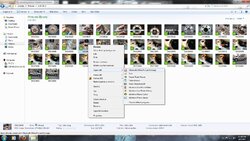
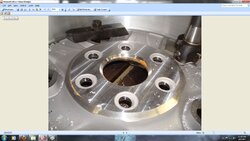
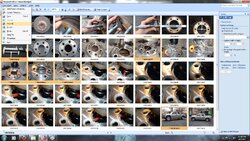
    I use Microsoft Office Picture Manager. It's not super easy to find (I found it using the Open With.... option when you right click a picture) but once you get the hang of it you can re-size multiple images at once. Even easier and much faster than MS Paint.

    Step 1.jpg

    Right click one of the files you want to re-size. Use the Open With... option and select MS Office Picture Manager.

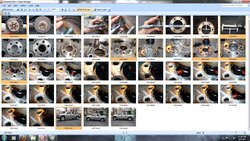
    Step 2.jpg

    Choose the Thumbnail view (upper left corner) and you will see all the pics in that folder.

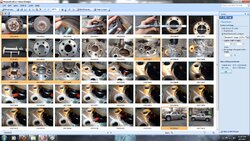
    Step 3.jpg

    Here I've highlighted the pics I want to re-size and am getting ready to click "Edit Pictures" (Top Center).

    Step 4.jpg

    A box appears on the right, at the bottom of it click "re-size" and it changes to the box pictured in my screenshot. Pick your size and click OK.

    Step 5.jpg

    Under the File menu drop down, click Save All and you're done.

    I often make copies of files I'm uploading in a temporary folder on my desktop and work from there. Do this before you re-size or edit the pictures. Leaves the original files untouched and when I'm done, clean up is easy. Just delete the temp folder. Best part is it takes the same amount of time to do one pic or a dozen or more.
    DexterDay likes this.
  13. swagler85 Minister of Fire

    joined: Mar 4, 2012
    976 posts
    NE Ohio
    All the programs to resize are great programs but anyone with windows it is really easy all you have to do is open you folder with pictures and right click the picture then select resize
  14. MasterMech Minister of Fire

    joined: Aug 2, 2011
    4,751 posts
    Hudson Valley NY
    I have Windows 7 and don't have the option to resize like that. Don't remember it from XP either. Maybe you have a program installed that added that feature. Sounds handy.
  15. chuckie5fingers Member

    joined: Feb 20, 2012
    163 posts
    60 S. of Chicago
    how would i post pics from my iphone?
    it doesnt let me open up the file format
    thanks chuck
  16. Standingdead Member

    joined: Oct 8, 2012
    94 posts
    Burnt Hills NY
    Nothing happens when I tap the choose file button to upload files on my IPad. Do I have to use a PC? Thanks!
  17. DexterDay Minister of Fire

    joined: Dec 11, 2010
    9,034 posts
    NE Ohio
    Can Apple users download the Tapatalk App?

    Dont know if that will help with picture viewing ?
  18. Standingdead Member

    joined: Oct 8, 2012
    94 posts
    Burnt Hills NY
    Ok I will try it. Thanks.
  19. webbie Administrator

    joined: Nov 17, 2005
    10,916 posts
    Western Mass.
    ios does not have a standard file system - also does not run flash (upload is flash based)....I think tapatalk may make it work. You can also link to the photos (put them elsewhere) instead of uploading them.
  20. Jack Straw Minister of Fire

    joined: Dec 22, 2008
    2,006 posts
    Schoharie County, N Y
    I use photo bucket.

Share This Page