1. Welcome Hearth.com Guests and Visitors - Please enjoy our forums!
    Hearth.com GOLD Sponsors who help bring the site content to you:
    Jotul Cast Iron Stoves
    Woodstock Soapstone Stoves
    Hearth and Home (QuadraFire and Harman Stoves)
Thread Status:
Not open for further replies.
  1. Sean McGillicuddy Member

    joined: Jan 7, 2012
    188 posts
    Easton mass.
    How do we rertrieve Messages? _g
    #1

    Helpful Sponsor Ads!


  2. firefighterjake Minister of Fire

    joined: Jul 22, 2008
    13,455 posts
    Unity/Bangor, Maine
    Should just have to click on the inbox at the top right of the page you are on . . . and then click on the Personal Message to read it.
  3. webbie Administrator

    joined: Nov 17, 2005
    10,918 posts
    Western Mass.
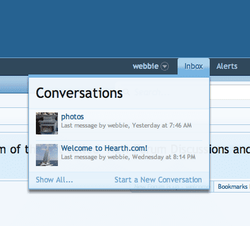
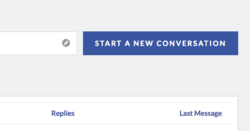
    They are called "conversations" here, but are the same thing as PM's (private messages) on the old forum. Note the three screens below:

    Screen Shot 2012-05-04 at 10.44.51 AM.png
    -------
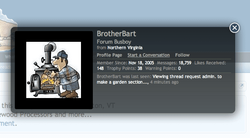
    You can search for members OR click their avatars...up comes a box like below, and you then "Start a Conversation".

    Screen Shot 2012-05-09 at 5.53.25 PM.png
    ---------
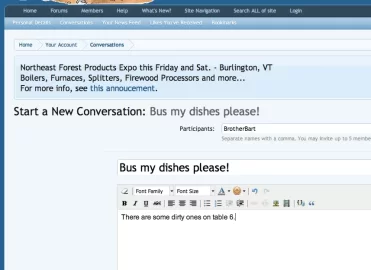
    This screen will then open up and allow to title the conversation as well as write the message, attach files, etc.
    Screen Shot 2012-05-09 at 5.54.13 PM.png
  4. webbie Administrator

    joined: Nov 17, 2005
    10,918 posts
    Western Mass.
    Note that PM's from the OLD system still exist. Members who need to access them can do so at the "Edit Your Profile" link at this page:
    http://www.hearth.com/econtent/index.php
    Note the expanded Private Message area on the left bottom of the screen (enclosed and on that page)

    Screen Shot 2012-05-09 at 6.04.33 PM.png
  5. webbie Administrator

    joined: Nov 17, 2005
    10,918 posts
    Western Mass.
    Note that we now have a link inside each avatar display so folks can more easily start a conversation (private message)
Thread Status:
Not open for further replies.

Share This Page