1. Welcome Hearth.com Guests and Visitors - Please enjoy our forums!
    Hearth.com GOLD Sponsors who help bring the site content to you:
    Jotul Cast Iron Stoves
    Woodstock Soapstone Stoves
    Hearth and Home (QuadraFire and Harman Stoves)
  1. webbie Administrator

    joined: Nov 17, 2005
    11,041 posts
    Western Mass.
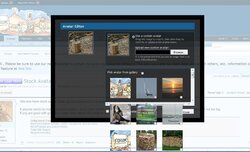
    We now have stock avatars that can be chosen from the Avatar link in your personal profile settings.

    If anyone wants to make up stock Avatars - go to it and email or post them in this thread...I will upload. Basically, make they square and not too big.
    If you are good with graphics, make them about 200 pixels or so square....
    #1

    Helpful Sponsor Ads!


  2. fossil Super Moderator

    joined: Sep 30, 2007
    9,263 posts
    Bend, Oregon
    That gallery needs some tweaking, boss...unless it's just me. I can pull it up by clicking on Avatar in my profile, and I see the upper part of the page load, but I can't scroll it or interact with it. I can see the top three stock avatars, and the top halves of the next row down...but I can't do anything else with it.
  3. LLigetfa Minister of Fire

    joined: Nov 9, 2008
    7,310 posts
    NW Ontario
    Ja, the bottom of the window is too far down and out of reach. Craig must have a bigger monitor.
  4. webbie Administrator

    joined: Nov 17, 2005
    11,041 posts
    Western Mass.
    I didn't set the window - it's set by the add-on.
    But it should scroll....it does easily in my browser........
    I will see if the window can be made smaller.
  5. webbie Administrator

    joined: Nov 17, 2005
    11,041 posts
    Western Mass.
    I shortened that window a bit...
  6. fossil Super Moderator

    joined: Sep 30, 2007
    9,263 posts
    Bend, Oregon
    Ain't workin' for me. You're just trying to get me to finally give up on IE and go get myself a MAC, aren't you? :rolleyes:
  7. LLigetfa Minister of Fire

    joined: Nov 9, 2008
    7,310 posts
    NW Ontario
    OK, it fits within my 1366x768 laptop display now.
  8. LLigetfa Minister of Fire

    joined: Nov 9, 2008
    7,310 posts
    NW Ontario
    What res are you running, 800x600? I have a few oldtimers running it that low.
  9. fossil Super Moderator

    joined: Sep 30, 2007
    9,263 posts
    Bend, Oregon
    1600 x 900 20" LCD flat screen
  10. fossil Super Moderator

    joined: Sep 30, 2007
    9,263 posts
    Bend, Oregon
    Here's what I see, and I can't do anything with it.

    Capture.jpg
  11. webbie Administrator

    joined: Nov 17, 2005
    11,041 posts
    Western Mass.
    That is really strange - but, really, as an engineer you should use Chrome! Do you have another browser on that machine....no need for a Mac....just try a different browser.
  12. fossil Super Moderator

    joined: Sep 30, 2007
    9,263 posts
    Bend, Oregon
    Maybe I'll have to try out this danged Firefox everyone's been hootin' about...we'll see. Luckily, I don't want to change my avatar now anyway.
  13. webbie Administrator

    joined: Nov 17, 2005
    11,041 posts
    Western Mass.
    Chrome is even faster......
  14. LLigetfa Minister of Fire

    joined: Nov 9, 2008
    7,310 posts
    NW Ontario
    What version of IE you using? It works for me in IE8 and in Chrome.
  15. fossil Super Moderator

    joined: Sep 30, 2007
    9,263 posts
    Bend, Oregon
    IE9 on WIN7
  16. BrotherBart He Who Moderates

    joined: Nov 18, 2005
    22,174 posts
    Northern Virginia
    I saw the same thing earlier. But since you shortened the pop up window I can see the whole thing and scroll the avatars.
  17. LLigetfa Minister of Fire

    joined: Nov 9, 2008
    7,310 posts
    NW Ontario
    I just testd on the wife's laptop with Win7/IE9 and it works there too.

Share This Page